NoctO₂ can tell the people you choose when an alarm goes unanswered in the night. Setup takes two minutes, and there are no accounts: family members join with a 6-digit code.
An example with the recommended settings: the family is told after 2 minutes without “I’m OK”.
The monitoring iPhone sounds its alarm, just as it does without family alerts.
If the alarm is answered in time, nothing is sent. Short dips you handle yourself stay private.
“Mom: Low SpO₂ 86%”, sent to every family member at once.
The monitoring phone and the rest of the family see who is following up. With Live Sharing on, family can check the current readings too.
The iPhone next to the person wearing the oximeter.

Choose “This phone monitors someone”, then “Set up family alerts”. The family is created straight away.

Family → Join Codes. Give the permanent code, or make a 24-hour code for one-off invites. Up to 6 family members.
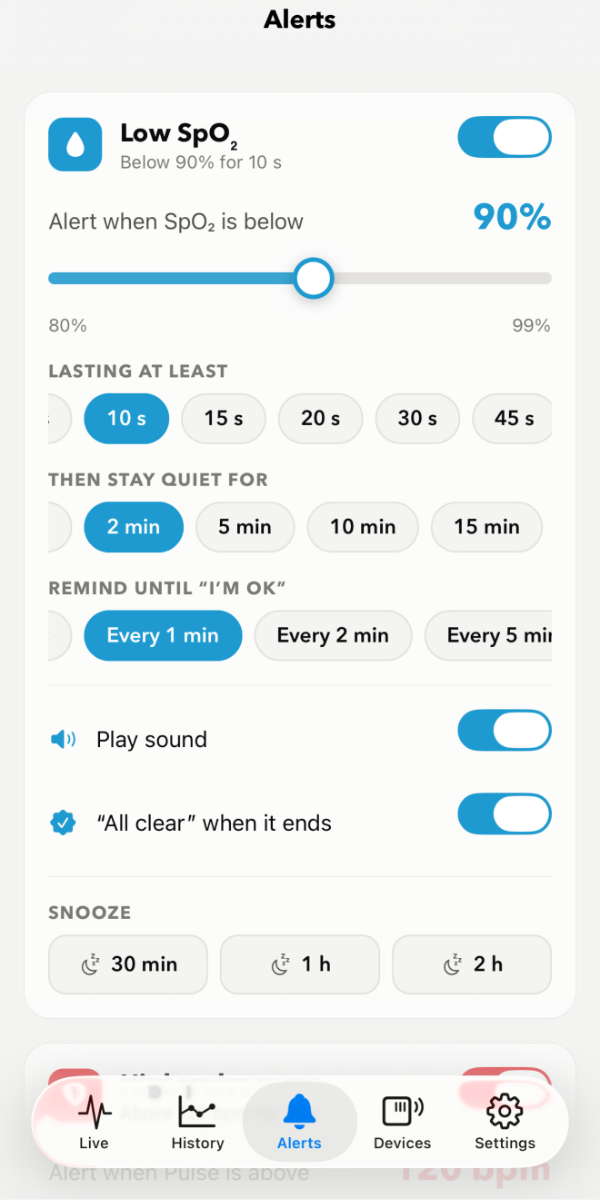
In the Alerts tab, each alert has a “Tell family” switch. Blood oxygen, pulse and off-finger are on by default.

Family → Alert Timing: how long an alarm can go without “I’m OK” before the family is told. 2 minutes is recommended for the night.

Family → Live Sharing lets family members see SpO₂ and pulse while you’re monitoring, updated every 1–2 minutes.

On the Family page, tap “Send a test alert to the family”. Everyone should get it within a few seconds.
No oximeter, no account. Just NoctO₂ and a code.
Choose “I’m a family member”.

Type the code you were given and the name the family will see, then tap Join. You’re in straight away.
Tap Allow, or alerts can’t reach you. For alerts during Sleep or Do Not Disturb, see Support → Sleep Focus.

It shows on the Lock Screen with a sound, even if NoctO₂ is closed. Tap it to open the details.

Lets the monitoring phone and the rest of the family know you’re following up, so nobody wonders whether the alert was noticed.
The Family tab shows the last week of messages and, if Live Sharing is on, the current SpO₂, pulse and the last hour.
No. They install NoctO₂ on their iPhone and enter the code. Nothing else.
Up to 6 family members per monitoring phone.
The permanent code keeps working until you change it or turn it off, which is handy for close family. A 24-hour code expires after a day and is good for a one-off invite. You can change or turn off either one in Family → Join Codes.
No. They are only told when an alarm isn’t answered with “I’m OK” within the time you set, and only for the alerts with “Tell family” switched on. Choosing “Immediately” sends every alarm, so 2 minutes is recommended for the night.
Both iPhones need an internet connection (Wi-Fi or mobile data), and the family member must allow NoctO₂ notifications. To hear alerts during Sleep or Do Not Disturb, add NoctO₂ to the allowed apps of that Focus.
On the monitoring phone: Family → Members → Remove next to their name. On a family member’s phone: Family → “Leave this family”. Deleting the family on the monitoring phone removes everyone.
Only the alert itself (for example “Low SpO₂ 86%”, the family name and the time), who tapped “Seen it”, and, if you turn it on, the live readings of the last hour. Messages are kept for 7 days. Read the details in the privacy policy.
No. Family alerts depend on phones, the internet and push notifications, and can be delayed or missed. NoctO₂ is a monitoring aid, not a medical device or an emergency service.